
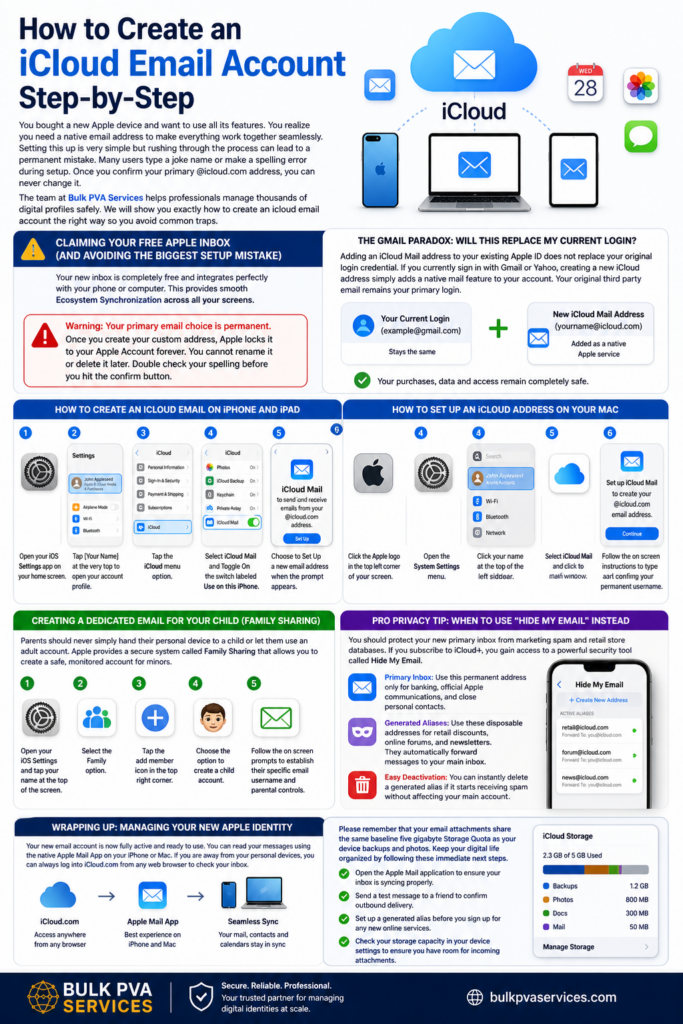
You bought a new Apple device and want to use all its features. You realize you need a native email address to make everything work together seamlessly. Setting this up is very simple but rushing through the process can lead to a permanent mistake. Many users type a joke name or make a spelling error during setup. Once you confirm your primary @icloud.com address, you can never change it. The team at Bulk PVA Services helps professionals manage thousands of digital profiles safely. We will show you exactly how to create an icloud email account the right way so you avoid common traps.
Claiming Your Free Apple Inbox (And Avoiding the Biggest Setup Mistake)
Your new inbox is completely free and integrates perfectly with your phone or computer. This provides smooth Ecosystem Synchronization across all your screens. You must understand one strict rule before you begin clicking buttons.
Warning: Your primary email choice is permanent. Once you create your custom address, Apple locks it to your Apple Account forever. You cannot rename it or delete it later. Double check your spelling before you hit the confirm button.
The Gmail Paradox: Will This Replace My Current Login?
Adding an iCloud Mail address to your existing Apple ID does not replace your original login credential. If you currently sign in with Gmail or Yahoo, creating a new iCloud address simply adds a native mail feature to your account. Your original third party email remains your primary login.
This is the most common point of confusion for new users. You do not need to worry about losing access to your past purchases. Your new inbox just becomes an additional way to use Apple services. You can safely complete the Device Verification process without breaking your current setup.
How to Create an iCloud Email on iPhone and iPad
To create a free iCloud email address on your iPhone or iPad, open your device settings and tap your name at the top of the screen. Select iCloud from the menu, toggle on the iCloud Mail switch, and follow the prompts to secure your username.
- Open your iOS Settings app on your home screen.
- Tap [Your Name] at the very top to open your account profile.
- Tap the iCloud menu option.
- Select iCloud Mail and Toggle On the switch labeled Use on this iPhone.
- Choose to Set Up a new email address when the prompt appears.
- Type your desired username and follow the final confirmation steps to lock in your Primary Email Alias.
How to Set Up an iCloud Address on Your Mac
Desktop users have a very similar pathway to claim their inbox. Apple recently updated the menu names on their computers. You will look for macOS System Settings instead of System Preferences.
- Click the Apple logo in the top left corner of your screen.
- Open the System Settings menu.
- Click your name at the top of the left sidebar.
- Click on iCloud in the main window.
- Select iCloud Mail and click to Configure your new address.
- Follow the on screen instructions to type and confirm your permanent username.
Creating a Dedicated Email for Your Child (Family Sharing)
Parents should never simply hand their personal device to a child or let them use an adult account. Apple provides a secure system called Family Sharing that allows you to Create a safe, monitored account for minors. This ensures they have their own ecosystem identity without compromising your personal data.
You can easily set up a dedicated inbox for your child directly from your own device.
- Open your iOS Settings and tap your name at the top of the screen.
- Select the Family option.
- Tap the add member icon in the top right corner.
- Choose the option to create a child account.
- Follow the on screen prompts to establish their specific email username and parental controls.
Pro Privacy Tip: When to Use “Hide My Email” Instead
You should protect your new primary inbox from marketing spam and retail store databases. If you subscribe to iCloud+, you gain access to a powerful security tool called Hide My Email. This feature allows you to Generate random, unique email aliases whenever a website asks for your contact information.
Understanding the difference between your main account and your aliases is critical for digital security. The experts at Bulk PVA Services highly recommend using aliases for all public signups.
- Primary Inbox: Use this permanent address only for banking, official Apple communications, and close personal contacts.
- Generated Aliases: Use these disposable addresses for retail discounts, online forums, and newsletters. They automatically forward messages to your main inbox.
- Easy Deactivation: You can instantly delete a generated alias if it starts receiving spam without affecting your main account.
Wrapping Up: Managing Your New Apple Identity
Your new email account is now fully active and ready to use. You can read your messages using the native Apple Mail App on your iPhone or Mac. If you are away from your personal devices, you can always log into iCloud.com from any web browser to check your inbox.
Please remember that your email attachments share the same baseline five gigabyte Storage Quota as your device backups and photos. Keep your digital life organized by following these immediate next steps.
- Open the Apple Mail application to ensure your inbox is syncing properly.
- Send a test message to a friend to confirm outbound delivery.
- Set up a generated alias before you sign up for any new online services.
- Check your storage capacity in your device settings to ensure you have room for incoming attachments.
Frequently Asked Questions
Can I change my primary iCloud email address later? No. Once you create and confirm your primary username, Apple locks it to your account permanently. You cannot rename it or delete it. If you made a spelling mistake, your only option is to create a completely new Apple Account from scratch.
Will creating this account delete my current Gmail login? Creating a new native Apple email does not delete or overwrite your current login credential. If you currently use a third party address to sign into your devices, that address remains your primary login. The new inbox simply becomes an added feature on your existing profile.
Can I check my Apple email on an Android phone or Windows PC? Yes. You are not restricted to Apple hardware. You can access your inbox from any device by opening a web browser and logging into the official iCloud website. You can also configure third party email applications on Windows or Android to receive your messages using specific server settings.
Does this new email address cost money? Creating the standard email account is completely free. It utilizes the free five gigabytes of storage that comes with every basic account. You only pay money if you choose to upgrade your storage capacity or subscribe to premium privacy features.Why does my phone say my chosen username is unavailable? Apple requires every single username to be completely unique across their entire global network. If you see an error message, it means another user already claimed that exact spelling. You must add numbers or pick a different combination of words to proceed.