
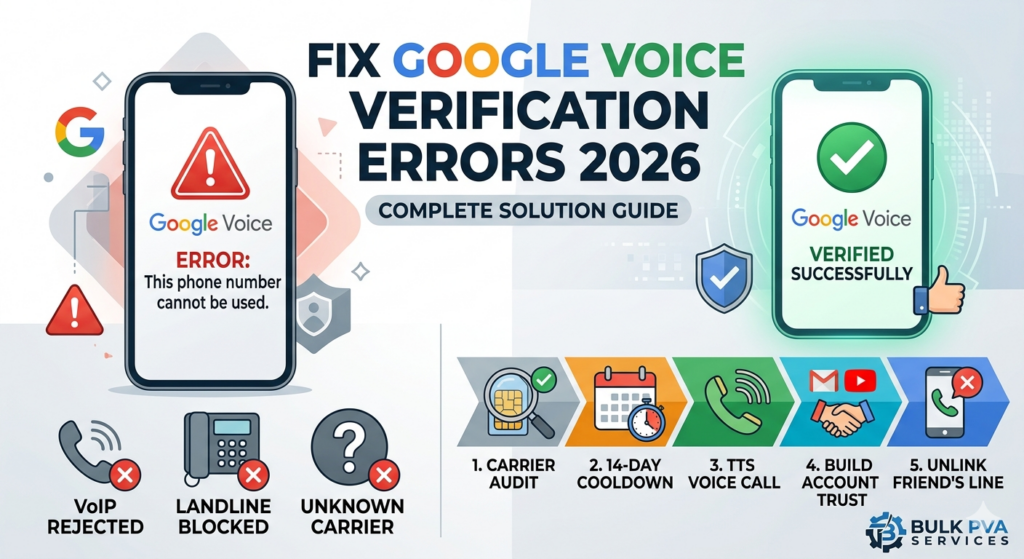
You are staring at a screen that says your number is not accepted. Your workflow is stuck because your google voice verification not working error will not go away. This is not a random glitch in the system. Google is actively rejecting your number to stop spam. At Bulk PVA Services, we see this exact block happen to digital marketers and business owners every single day. You need to understand the backend system blocking you before you try another number.
Table of Contents
ToggleWhy Is Google Voice Blocking Your Phone Number?
Google Voice verification fails primarily because Google uses real-time Line Type Intelligence (LTI) to query a number’s Operating Company Number (OCN). If the database flags the number as a Voice over IP (VoIP), landline, or a recently recycled number, the system automatically blocks the SMS verification code.
This strict filter stops automated systems from flooding the network. New Gmail profiles lacking an established residential IP environment are also treated as a ghost account and denied access. You cannot outsmart this system by just clearing your browser cache. You have to use phone numbers that pass specific carrier checks.
The Hidden Mechanics: Carrier Lookups and VoIP Rejections
When you submit a phone number, Google checks public telecom databases before sending a text message. They want to know exactly who owns the network attached to your phone. If they do not like the network owner, you get an error message on your screen.
Error Message | Root Cause |
“This phone number cannot be used for verification” | The number is classified as a VoIP or has been used to verify a different account within the last 365 days. |
“Try again later” | You hit the velocity limit by requesting too many codes. Your number is temporarily banned. |
“Cannot connect” | You are using a VPN or your IP address does not match a location within the 48 contiguous United States. |
How Google’s Line Type Intelligence (LTI) Flags Your Number
Understanding the exact steps Google takes will save you hours of frustration. The carrier lookup process happens in milliseconds.
- User Submits Number: You type your digits into the verification box and click send.
- Database Query: Google pings the LERG documentation using your number’s NPA-NXX routing code to find the carrier.
- Classification: The system checks if your provider is a major mobile carrier like AT&T or a virtual provider.
- Flagging: If the system sees a nonFixedVoip classification, it triggers the anti-abuse filters immediately.
- Rejection: The text message is never sent and you see the failure warning.
The 2026 Government ID (KYC) Mandate Explained
Important Warning: As of February 2026, Google mandates Government-issued ID verification for many new Google Voice applicants. Accounts flagged for suspicious activity must submit a Real ID or passport for a manual review process taking up to 72 hours.
This is the highest barrier to entry in the digital account market today. Many users buy a fresh SIM card, pass the initial carrier check, and still hit a wall. Google is now applying this KYC (Know Your Customer) mandate to older profiles that show unusual login patterns. We track these policy shifts closely at Bulk PVA Services to ensure our clients retain access to their established business lines. If your profile gets flagged for manual review, you cannot bypass it simply by buying a new phone number.
5 Proven Solutions for Google Voice Verification Errors
If your Google Voice verification is not working, the system follows rigid rules. You can bypass these filters by feeding the algorithm exactly what it wants to see.
Pre-Verification Carrier Audit
Telecom LookupCheck the line type before submission. Use a lookup tool to confirm a real SIM classification from a major network. Discard virtual or fixed VoIP numbers.
Bypass Velocity Shadowban
Rate Limit CooldownIf you trigger a silent ban by spamming the resend button, stop immediately. Wait exactly 14 days before attempting another verification with that number.
TTS Voice Call Fallback
SMS Filter BypassExploit the gap between text and voice filters. Select "Verify by phone" and use the automated Text-to-Speech code delivery to bypass heavy 2FA SMS protocols.
Build Account Trust
Algorithmic SignalsEstablish history by using Gmail and YouTube for two weeks without VPNs. Ensure your residential footprint stays within the 48 contiguous US states.
Immediate Unlink Strategy
Physical Line BorrowingUse a friend’s physical line to receive the 6-digit code. Once activated, immediately unlink the forwarding number in settings to keep the account independent.
When to Pivot: Commercial Alternatives to Google Voice
Sometimes the barrier is too high for your business model. If you need bulk account provisioning for a large team, fighting Google’s strict carrier lookups wastes money. You should transition to commercial telecom alternatives that offer guaranteed delivery. At Bulk PVA Services, we often advise scaling agencies to stop forcing consumer products to do enterprise work.
Feature | Google Voice | Paid VoIP solutions |
Verification Rules | Extremely strict carrier checks | None required |
Network Setup | Tied to personal Google accounts | Enterprise SIP forwarding available |
Scalability | High risk of sudden manual bans | Built specifically for large marketing teams |
Final Verdict on Securing Your Number in 2026
Fixing the google voice verification not working problem requires patience and exact execution. You have to use a legitimate mobile line and maintain KYC compliance at all times. Stop wasting time with cheap virtual numbers that fail the carrier lookup. Audit your lines, respect the cooldown periods, and your business accounts will stay active.
Frequently Asked Questions
Why am I not receiving the Google Voice verification code?
You are not receiving the code because Google identified your phone number as a virtual line. Their database blocks automated text messages to non-mobile networks instantly to prevent spam.
Can I bypass the Google Voice ID verification?
No, you cannot bypass the new 2026 ID requirement. If the system flags your account for manual review, you must upload a physical government document like a passport to proceed.
How long does the Google Voice verification block last?
A temporary block caused by clicking the resend button too many times lasts exactly 24 hours. A hard block for exceeding your annual verification limit requires a 14-day waiting period.
Will a prepaid SIM card work for Google Voice?
A prepaid SIM card will only work if the carrier is a top-tier network. Budget virtual operators are frequently blocked by the exact same filters that stop internet numbers.
How many Google Voice numbers can I have on one phone?
You can only link one Google Voice number to a single personal phone line at a time. Attempting to link multiple accounts will trigger an automatic suspension of all associated profiles.